Read your dashboard
The five figures, the bar under them, and the To invoice and Unpaid lists you work from each day.
For tutors. Updated October 2026.
Where to find it
Dashboard
Steps
Open Dashboard. The figures cover all time; the line under Earned says what you've earned this month.
Read the five figures and the bar under them. The money words explains each one and how they add up.
In Today, tap a session to mark it, change it or cancel it without opening the calendar.
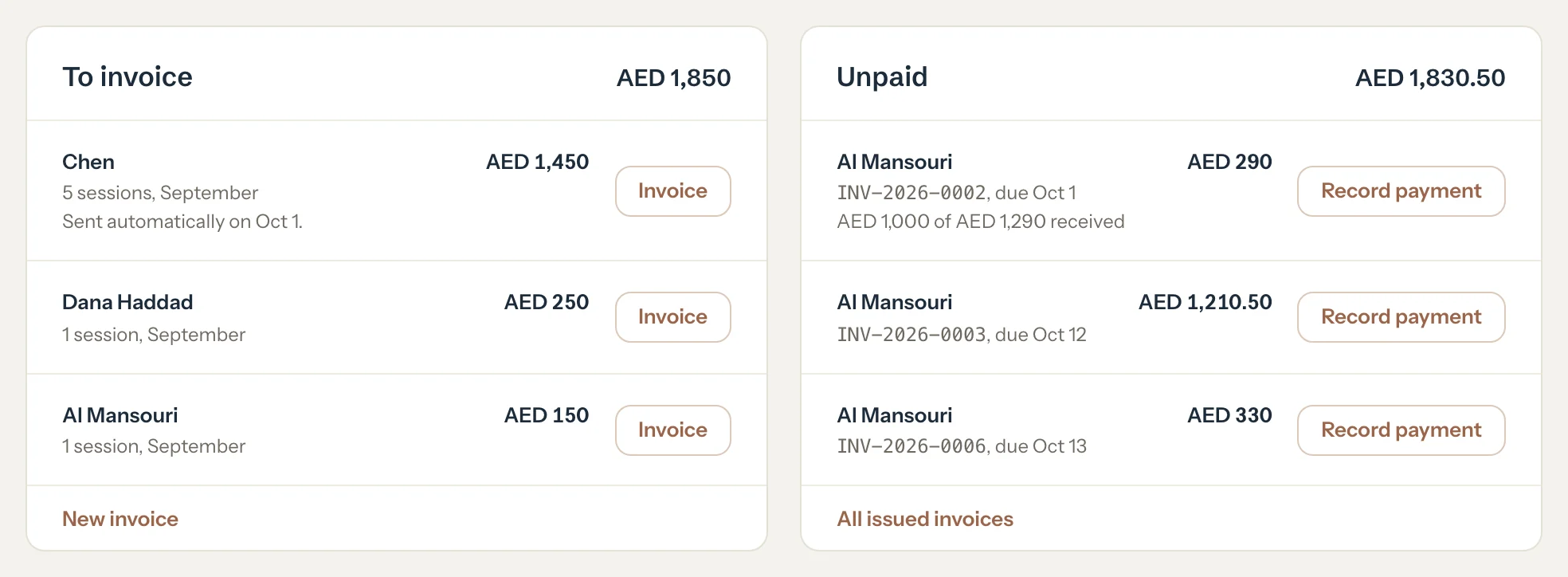
In To invoice, press Invoice beside a family or student.
A new invoice opens for them with every session up to their latest one ticked.
In Unpaid, press Record payment when a family pays an invoice.
Record payment opens with that invoice ticked and what's left to pay filled in.
When the To do card shows, clear its rows. It lists the jobs no figure shows, such as past sessions you haven't marked.
Optional: Press See insights to look back over 30 days, 3 months or 12 months.
An example
On 30 September nothing is overdue, so the Unpaid list runs by due date, and it adds up to the Unpaid figure:
- INV-2026-0002, Al Mansouri, due Oct 1
- AED 290
- INV-2026-0003, Al Mansouri, due Oct 12
- AED 1,210.50
- INV-2026-0006, Al Mansouri, due Oct 13
- AED 330
- Unpaid
- AED 1,830.50
Good to know
- Each list adds up to its figure: the To invoice list to To invoice, the Unpaid list to Unpaid.
- The Unpaid list puts overdue invoices first, the most days overdue first, then the others by due date.
- The To invoice list starts with the oldest session waiting. A row says when automatic invoicing will invoice it, or which draft already holds the sessions.
- Match shows in place of Record payment when money received without an invoice can be linked to that invoice. See Money received without an invoice.
- Families never see your dashboard.
- Prefer three figures and one list? Switch to the Simple dashboard.
If something's not right
Earned looks too low.
Past sessions still marked Scheduled aren't earned yet. The To do card lists them: press Mark to open the oldest one.
A family isn't in the To invoice list.
All its earned sessions are on issued invoices, or its sessions haven't been marked yet.
Related
Still stuck? Email support@tutello.ae.