Money received without an invoice, and Match
Record money before you invoice, then link it to the invoice later.
For tutors. Updated October 2026.
Where to find it
- On a phone
- Billing, then Payments, then Record payment
- On a computer
- Payments, then Record payment
To link the money to an invoice later, open that invoice and press Match payments.
Steps
In From, choose the family, or the student who pays for their own sessions.
If invoices are listed, press Untick all so none is ticked.
The form says the payment goes to the oldest invoice first.
Type the Amount, choose the Date received and the Method, then press Record payment.
Later, to link it to one invoice, open that invoice and press Match payments.
Payments without an invoice lists the family's payments that have no invoice. The ones that fit this invoice are already ticked.
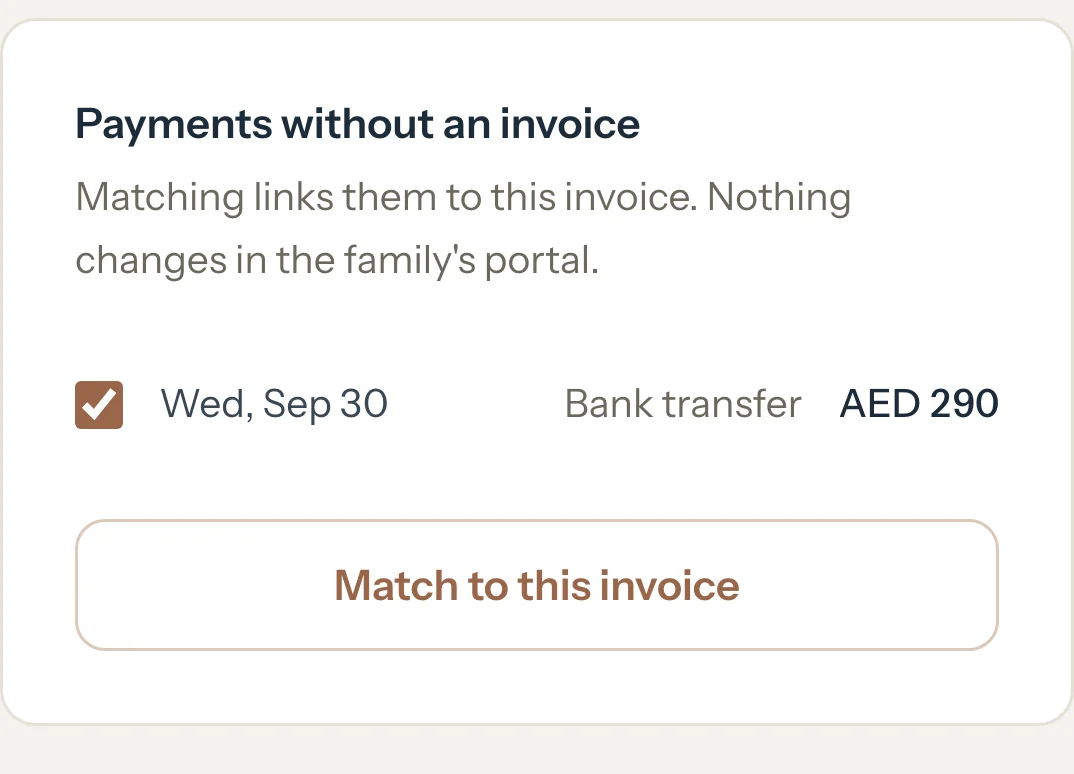
Tick the payments that belong to this invoice and press Match to this invoice.
An example
Huda sends AED 500 before you've invoiced October, and you record it with nothing ticked. The Al Mansouri family still has AED 290 left on INV-2026-0002 and AED 1,210.50 on INV-2026-0003, so the AED 500 counts like this:
- INV-2026-0002, now Paid
- AED 290
- INV-2026-0003, AED 1,000.50 left to pay
- AED 210
- Total
- AED 500
What happens next
- Payments lists the AED 500 with no invoice number.
- INV-2026-0002 reads Paid. Its page says it includes AED 290 received without an invoice.
- With the Detailed dashboard, To do lists INV-2026-0002 with a Match button until you match the payment.
What parents see
- The same as you: INV-2026-0002 shows Paid in Billing, and their Balance due is AED 500 lower.
- Matching the payments that are already ticked changes nothing they see.
Good to know
- Money with no invoice always counts toward the oldest invoice by invoice date, so a newer invoice never takes money from one that already shows as paid.
- Once every invoice is paid, the rest is paid ahead and counts toward the next invoice you save.
- Matching only links the payment to the invoice. What the family owes in total stays the same.
- If matching would take money from another invoice, the page says which one and what it will have left, before you press Match to this invoice.
If something's not right
Match payments isn't on the invoice.
It shows on an issued invoice when the family has a payment recorded without an invoice. Drafts, cancelled invoices and invoices marked paid don't offer it.
Nothing is ticked when Payments without an invoice opens.
That money already counts toward older invoices. You can still tick a payment; the page tells you what moves before you match it.
"A payment was just matched to another invoice. Check the list and try again."
It was matched on another device or page a moment ago. Look at the list again, then match what's still there.
Related
Still stuck? Email support@tutello.ae.