Record a payment that covers several invoices
When a family pays two or more invoices with one transfer, record it once and Tutello splits it over them, oldest first.
For tutors. Updated October 2026.
Where to find it
- On a phone
- Billing, then Payments, then Record payment
- On a computer
- Payments, then Record payment
Opened from an invoice's page, Record payment ticks only that invoice. Tick the others this payment covers.
Before you start
The invoices must be saved. A draft can't be paid: open it and press Save first.
Steps
In From, choose the family, or the student who pays for their own sessions.
Invoices to pay lists each of their saved invoices with money left to pay, oldest first, and all of them are ticked.
Untick any invoice this payment isn't for. Untick all clears every tick, and Tick all puts them back.
Check Amount. It follows the ticks: the total left to pay on the ticked invoices. If you received a different amount, type it. From then on, ticking no longer changes it.
Read How it's split. Each ticked invoice shows what it gets, oldest first: Paid in full, Pays what's left, what will be left to pay, or Not covered. Money beyond the ticked invoices shows on a No invoice row. The sentence under the box says the same in words.
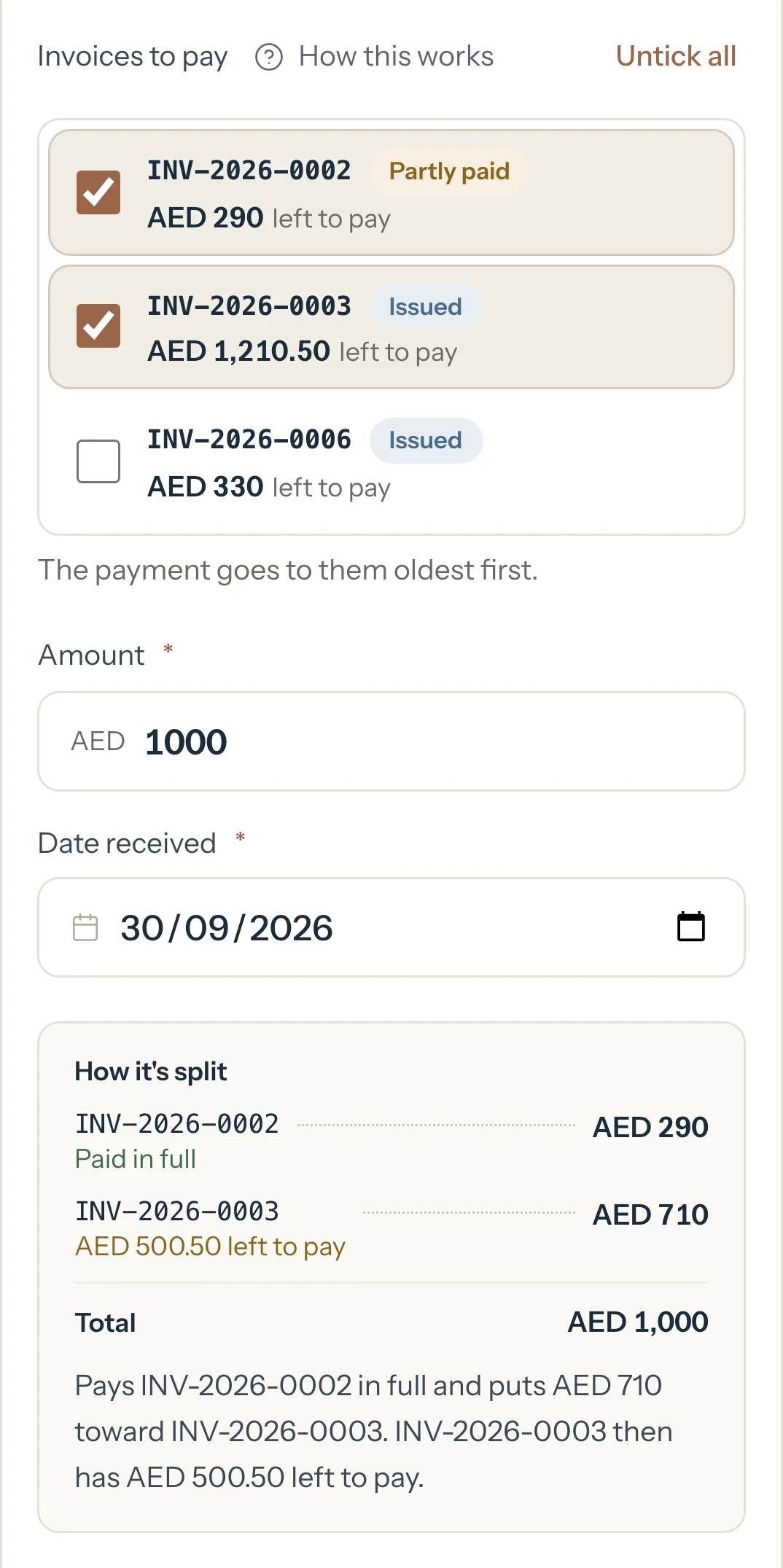
The second invoice keeps AED 500.50 to pay. In Date received, choose the day the money reached you. It can't be later than today.
Choose the Method: Cash, Bank transfer, Card, Cheque or Other.
Optional: In Notes, add the transfer reference.
Press Record payment.
An example
The Al Mansouri family has AED 290 left to pay on INV-2026-0002, AED 1,210.50 on INV-2026-0003 and AED 330 on INV-2026-0006. Huda sends one bank transfer of AED 1,000 for the first two. Untick INV-2026-0006 and type 1,000 in Amount. How it's split shows:
- INV-2026-0002, Paid in full
- AED 290
- INV-2026-0003, AED 500.50 left to pay
- AED 710
- Total
- AED 1,000
"Pays INV-2026-0002 in full and puts AED 710 toward INV-2026-0003. INV-2026-0003 then has AED 500.50 left to pay."
What happens next
- Payments shows one line for the AED 1,000, with both invoice numbers.
- INV-2026-0002 reads Paid. INV-2026-0003 reads Partly paid, and its Record payment is filled in with the AED 500.50 left.
- On your dashboard, Paid goes up by AED 1,000 and Unpaid goes down by the same amount. The family's Balance due goes down by AED 1,000.
What parents see
- In Billing, INV-2026-0002 shows Paid and INV-2026-0003 shows Partly paid with what's left to pay. Their Balance due is the figure you see on the family's page.
- The invoice and its PDF show Total, Paid as of the day and Left to pay.
- Nothing is sent to them when you record it. If you share INV-2026-0003 later, its message says what's left to pay.
Good to know
- The oldest invoice by invoice date is paid first, whatever order you tick them in. Only the last one can stay partly paid.
- If you record more than the ticked invoices need, the extra goes to the family's other invoices first, then counts as paid ahead. Money paid ahead counts toward the next invoice you save.
- With none ticked, the payment goes to the oldest invoice first.
- It stays one payment: one line in Payments, even though each invoice shows its part.
- A payment can't be edited. If the amount, date or family is wrong, delete it and record it again. Deleting it removes it from every invoice it paid.
- If you later cancel one of these invoices, the payment stays: its part goes to the family's other invoices first, then counts as paid ahead.
If something's not right
An invoice isn't in the list.
It may be a draft (save it first), already paid, cancelled, or on another family's or student's account. An adult learner's invoices are under their own name in From.
"That invoice is already paid, so it isn't listed."
Nothing is left to pay on it. Record the money on another invoice, or leave every invoice unticked to count it toward the oldest.
"These invoices just changed. Check them and try again."
One of them changed on another device, for example a payment was recorded or an invoice was cancelled. Check the list, then press Record payment again.
It says the most you can record is less than you typed.
The student has moved into a family since these invoices were made. Record the rest on the family.
Related
Still stuck? Email support@tutello.ae.