Money paid ahead
Extra money counts toward the next invoice, and you see it before you save that invoice.
For tutors. Updated October 2026.
Where to find it
- On a phone
- Billing, then New invoice
- On a computer
- Invoices, then New invoice
Invoice now on a family's page starts the same new invoice with the family chosen.
Steps
Record the payment as usual. When it's more than the family's invoices need, the form says the extra counts as paid ahead.
When you next invoice the family, press New invoice, choose the family and tick the sessions.
At Review, read the two rows under the total: Already paid and Left to pay.
The sentence under them says how much was paid ahead and what will be left.
Press Save.
The money paid ahead counts toward the invoice. If it covers the whole total, the invoice shows as paid.
An example
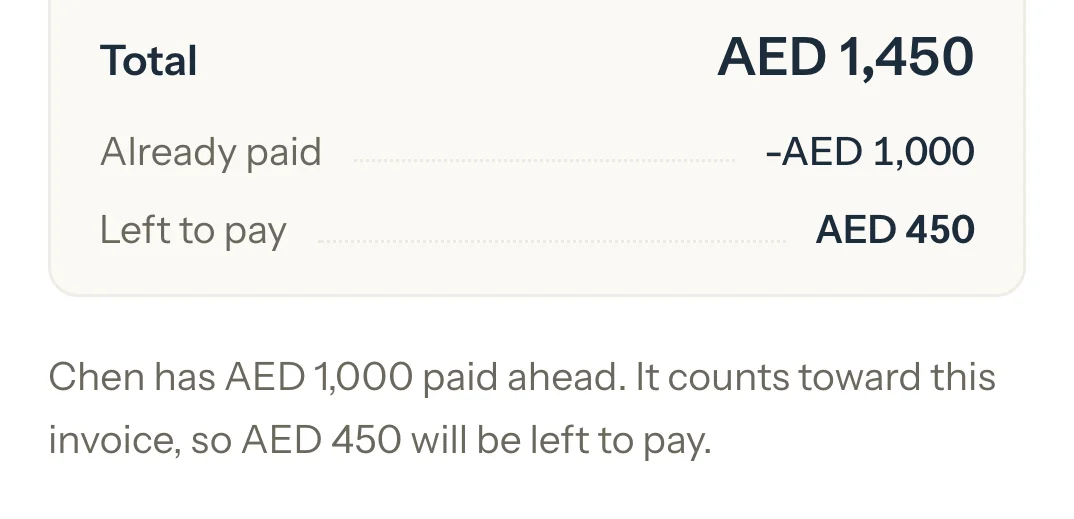
The Chen family has paid AED 1,000 ahead. You invoice Lucas's five Chemistry sessions, AED 1,450 in all:
- Total
- AED 1,450
- Already paid
- AED 1,000
- Left to pay
- AED 450
"Chen has AED 1,000 paid ahead. It counts toward this invoice, so AED 450 will be left to pay."
What happens next
- On the Detailed dashboard, until an invoice uses it, Paid carries a line such as Plus AED 1,000 paid ahead. When the family has sessions to invoice, the To invoice list says how much is already paid.
- The family's page shows it under Balance due. When they've paid more than they owe, the heading reads Credit balance.
- Once you save the invoice, its page counts the money paid ahead as received toward it.
What parents see
- In Billing, their balance has a Paid ahead line taken off what they owe.
- The saved invoice shows Total, Paid as of the day and Left to pay, like any invoice with money toward it.
Good to know
- On the Detailed dashboard, money paid ahead is never part of Paid: Paid is money toward invoices you've issued. On the Simple dashboard, Paid counts it up to what the family has earned.
- A draft doesn't use money paid ahead. It counts once you save the invoice.
- If you date the new invoice in the past, money the family already paid counts toward it first, and Review says so.
- Each family's money stays with that family. Money one family paid ahead never pays another family's invoice.
If something's not right
Review doesn't show Already paid.
The family has no money paid ahead, or you're saving a draft, which doesn't use it.
A new invoice shows as paid, but the family hasn't paid it.
Money they paid earlier covers it. The invoice's Payments card shows how much of it was paid before.
Related
Still stuck? Email support@tutello.ae.