Cancel a session, and when it's charged
Inside your cancellation window a cancelled session can be charged, and you choose before you cancel; earlier, it costs nothing.
For tutors. Updated October 2026.
Where to find it
Calendar, then the session
Today's sessions open from your dashboard too.
Before you start
Set your Late cancellation window once, in Settings, then Preferences. It starts at 24 hours.
Steps
Open the session from the calendar or from Today on your dashboard.
Read the line under Cancel session. It says what cancelling now costs, for example AED 330 or no charge, or No charge.
Press Cancel session.
Cancel this session? says whether this is a late cancellation.
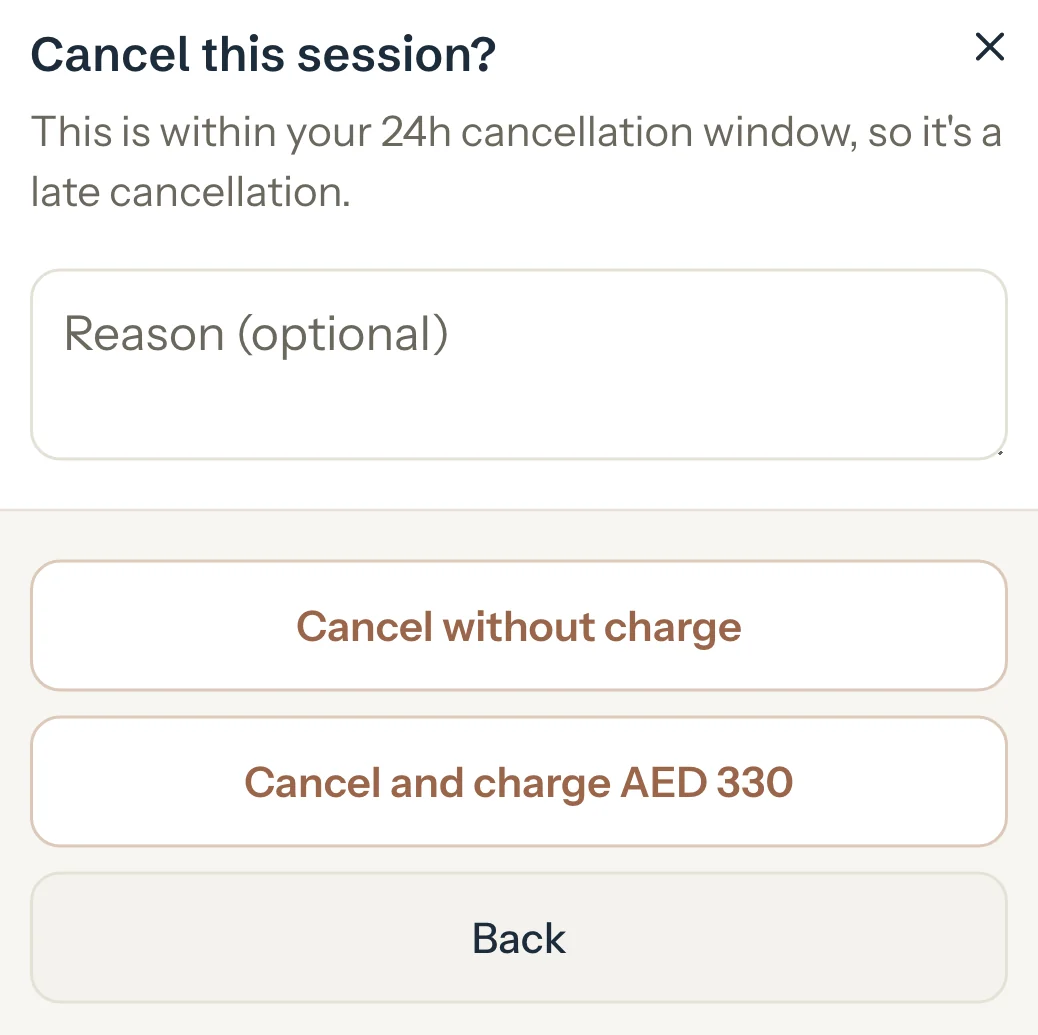
Optional: Type a reason.
For a late cancellation, press Cancel and charge AED 330 to charge it, or Cancel without charge to let it go. Otherwise there's one button: Cancel session.
The session is cancelled and the panel shows its new status.
An example
Sara's Math session is 1 h 30 min at AED 220 an hour, and your window is 24 hours. Her family cancels the evening before, so it's a late cancellation:
- Cancel and charge
- AED 330
- Cancel without charge
- AED 0
What happens next
- Charged, the session counts in Earned and To invoice for AED 330, like a session that happened.
- In a new invoice it starts unticked: tick it to charge it. Invoice from your dashboard's To invoice list and it's already ticked. Automatic invoices include it.
- Without charge, it's worth nothing and never goes on an invoice.
Good to know
- Cancelling after the session's start time is always a late cancellation.
- With No window, cancelling before the start is never charged.
- A late cancellation is charged at the booked length and rate, or at the total you typed for that session.
- Changed your mind about a fee? Open the session and press Waive fee, as long as it isn't on an invoice yet: see Waive a fee.
- Only a session that's still Scheduled and not on an invoice can be cancelled.
If something's not right
There's no Cancel session button.
The session is already marked, or it's on an invoice. Set a completed session back to Scheduled and save it first, or cancel the invoice it's on.
"This session is on an invoice. Cancel the invoice first."
A session on an invoice is locked. Cancel the invoice, then cancel the session and invoice the rest again.
Related
Still stuck? Email support@tutello.ae.