Date an invoice in the past
Give an invoice for past sessions an earlier date, as long as it's on or after the day of its last session.
For tutors. Updated October 2026.
Where to find it
- On a phone
- Billing, then New invoice
- On a computer
- Invoices, then New invoice
Steps
Start the invoice as usual: choose the family or student, then tick the sessions.
In Invoice date, choose the day the invoice should carry. It starts on today.
Due date moves with it and stays 7 days later, until you change it yourself.
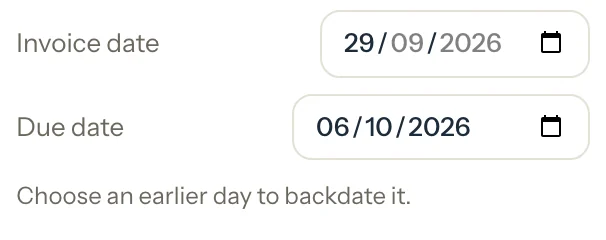
Optional: Change the Due date if you want. It can't be before the invoice date.
Press Save, or Save as draft.
Review invoice shows both dates again. For a draft the box is titled Save as draft and shows only the Invoice date: a draft gets its due date when you save it.
Check the dates and press Save, or Save as draft for a draft.
An example
On 30 September, the Al Mansouri family has one session to invoice: Omar's of 29 September. You date the invoice the day of the session:
- Earliest invoice date
- 29 Sep 2026
- Invoice date chosen
- 29 Sep 2026
- Due date, 7 days later
- 6 Oct 2026
Good to know
- The invoice date can't be later than today, or earlier than the day of the last session you ticked.
- A backdated invoice takes its date's year in its number: an invoice dated in December 2025 gets an INV-2025 number.
- If the due date has already passed, Review says so, and the invoice shows as overdue as soon as you save it.
- A draft keeps the date you chose. When you save it later, it's still dated that day, and it's due 7 days after the day you save it.
- When money received without an invoice was paying a later invoice, a backdated invoice comes first and takes that money. Review names the invoice that may then have money left to pay.
- Completed & paid dates its invoice on the session's day by itself.
If something's not right
It asks for a later day, the day of its last session.
One of the ticked sessions is later than the date you chose. Press the Use 29 Sep button beside the message (it names that day), or untick the session.
"Choose today or an earlier day."
An invoice can't be dated in the future. Choose today, and give the family more time with the Due date instead.
"The due date can't be before the invoice date."
Move the Due date to the invoice date or later.
Related
Still stuck? Email support@tutello.ae.