Read your report cards
Your tutor's report cards about you, in your own portal, with your topics, your progress and the sessions of each month.
For students. Updated October 2026.
Where to find it
- On a phone
- Report cards on the bar along the foot of the screen
- On a computer
- Report cards in the portal's menu
Steps
Open Report cards.
A new card reads New until you open it.
Press a card to open it.
It shows what your tutor wrote, the topics you worked on and the sessions of that month.
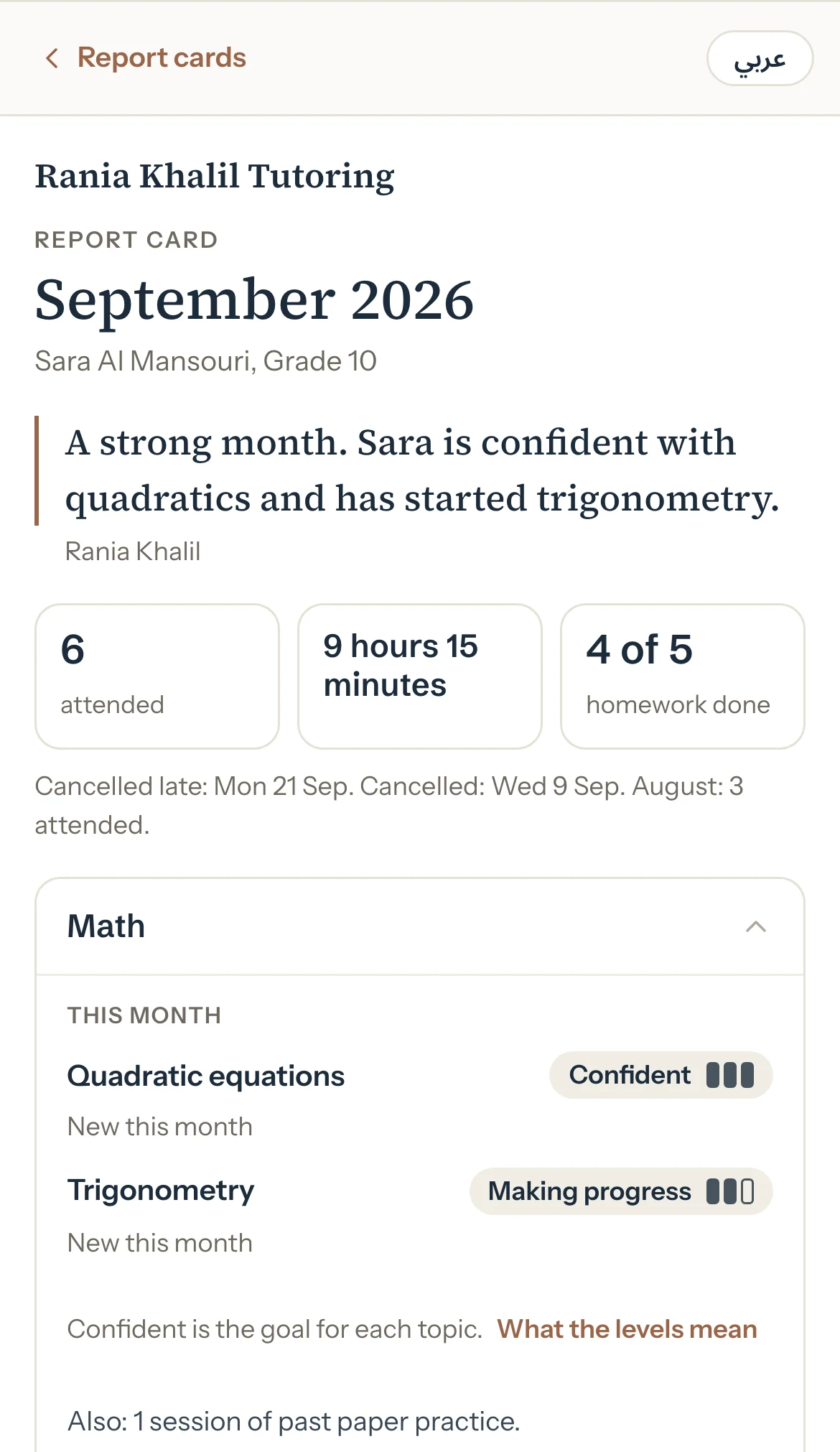
Optional: Press عربي to read the card's labels in Arabic, and English to go back.
Optional: Press Download PDF or Save as image to keep a copy. On a computer, Print prints it.
Good to know
- You see your own cards only, never a brother's or sister's.
- Your tutor decides whether your cards show in your own portal. Your parents see them either way.
- If you're an adult learner with your own account, you always see your own cards.
- Tutello puts nothing about money on a card. Cards are about your sessions and your progress.
- A card can change after you read it: it then reads Updated with its date.
If something's not right
There's no Report cards in your menu.
Your tutor hasn't published a card you can see yet. Ask them.
"This report card isn't available."
The card was taken down, or it isn't one you can see. Ask your tutor.
Related
Still stuck? Email support@tutello.ae.