Open, download or print an invoice
Open any invoice your tutor issued, see what's paid and what's left, and save it as a PDF.
For parents. Updated October 2026.
Where to find it
- On a phone
- Billing, then tap the invoice under Invoices
- On a computer
- Billing, then View on the invoice's row
A link to an invoice from your tutor opens it straight away once you're signed in.
Steps
Open Billing and find the invoice under Invoices.
Its chip reads Unpaid, Partly paid, Paid or Overdue.
On a phone, tap the invoice. On a computer, press View.
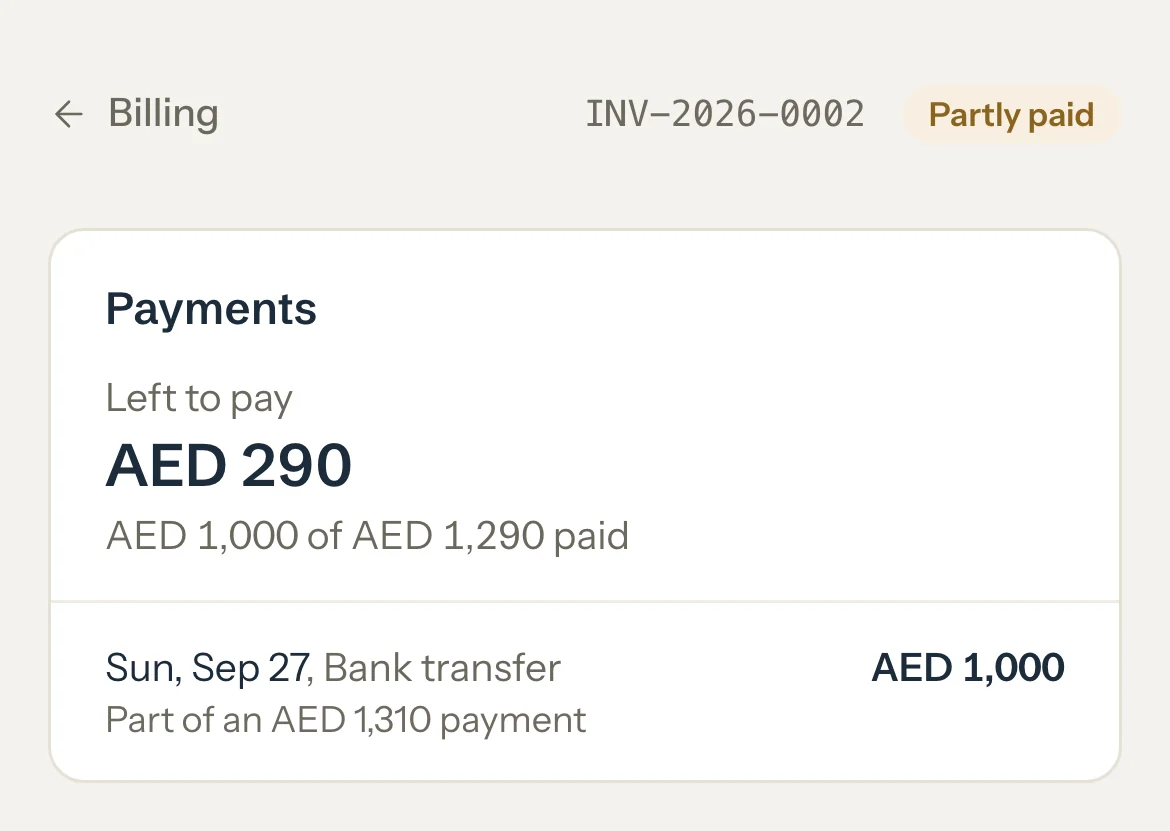
Read Payments, above the invoice, when something has been paid.
It shows Left to pay, or Paid in full, how much is paid so far, and each payment with its date and how it was paid.
Press Download PDF to keep a copy or send it on.
The PDF is the same invoice you see on screen.
Optional: To print, use your browser's print. Only the invoice prints.
An example
Mariam opens INV-2026-0002 on 30 September. Its chip reads Partly paid.
- Total
- AED 1,290
- Paid on 27 September, part of an AED 1,310 bank transfer
- AED 1,000
- Left to pay
- AED 290
"AED 1,000 of AED 1,290 paid"
Good to know
- An invoice shows here once your tutor issues it, even before they send it to you. Drafts and cancelled invoices never show.
- Once something is paid, the invoice itself lists Total, Paid as of that day, and Left to pay.
- A payment marked as part of a bigger payment covered more than one invoice. The amount beside it is this invoice's share.
- Payments without an invoice, or Other payments, is money you paid that wasn't for this invoice, counted toward it.
- The due date turns red when it has passed and money is still left.
If something's not right
Print or save as PDF shows instead of Download PDF.
The invoice has writing the PDF can't show. Press Print or save as PDF and choose to save it as a PDF in the print window.
"Too many PDF downloads. Try again in a few minutes."
Wait a little, then press Download PDF again.
An invoice is missing.
Your tutor may not have issued it yet, or cancelled it. Ask them.
Related
Still stuck? Email support@tutello.ae.